Joe speaks first
People and promises belong together. Joe keeps who you met, what matters to them and what you owe each other in one place. Your daily brief brings back the things that need attention, with context for a thoughtful next step.
Joe, in the app
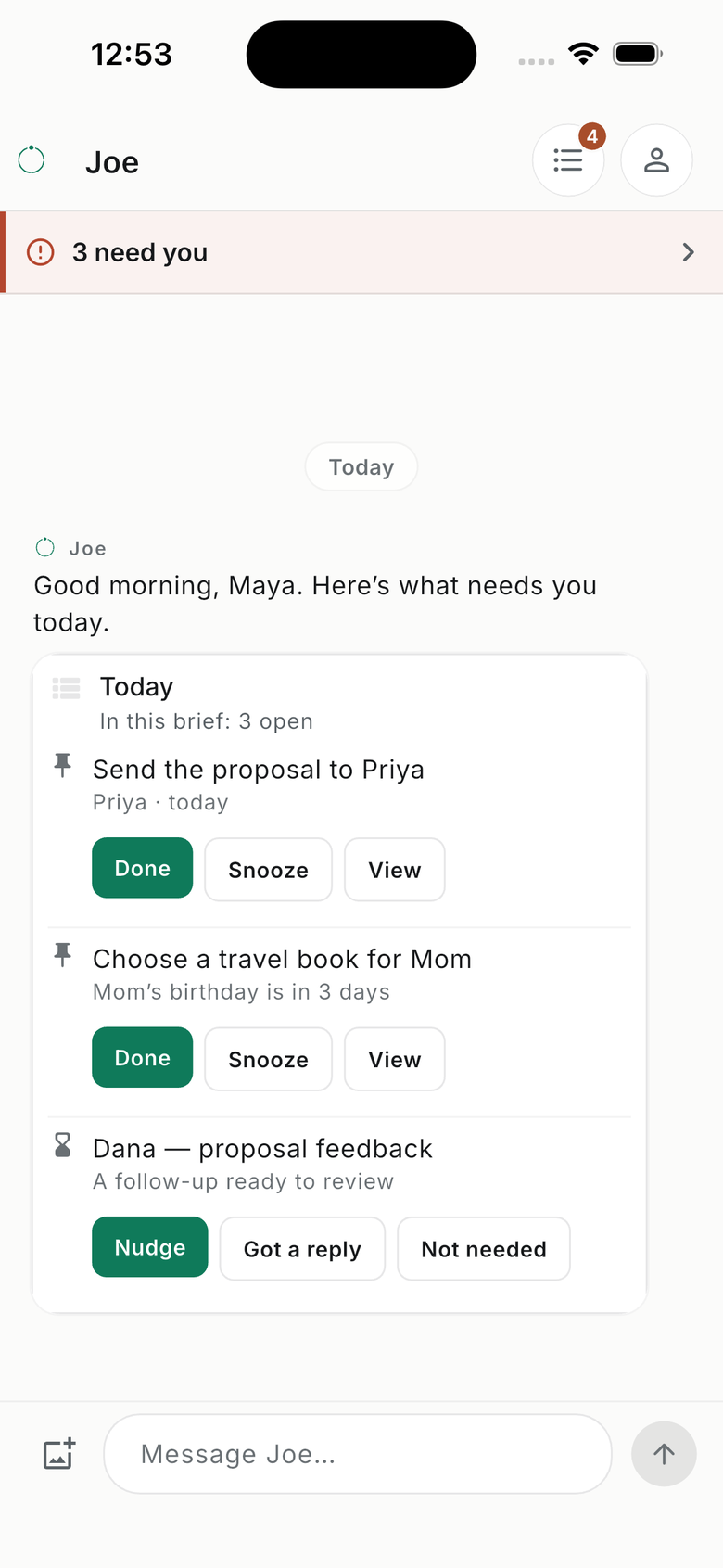
THE THREAD
A daily brief with the context to act.
See what is due, who is waiting on you and which questions need an answer. Open a saved item, review a draft or change a date when plans move.
Your brief, reminders and follow-ups stay in the Joe conversation. Link WhatsApp to reach the same saved people and commitments there, and choose where reminders arrive.
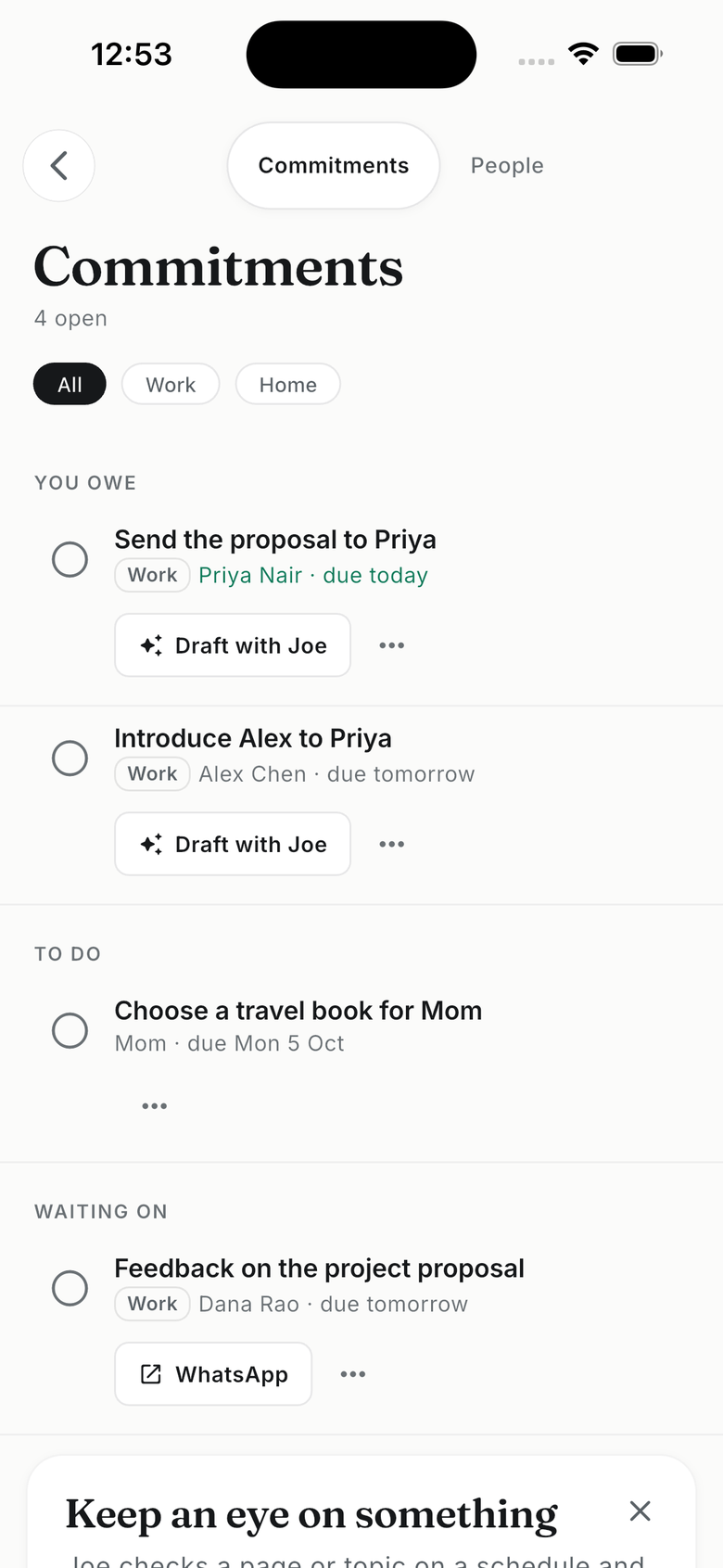
RECORDS
People, promises and bills. Easy to find again.
Commitments holds your tasks, bills and promises, including things you are waiting for. People keeps the details and shared history behind them. Review a saved item, correct it or mark it done.
Forward a bill or statement to the Joe address shown in the app. Review the amount and due date, then open the available payment app or website. Joe keeps the reminder; you make the payment.
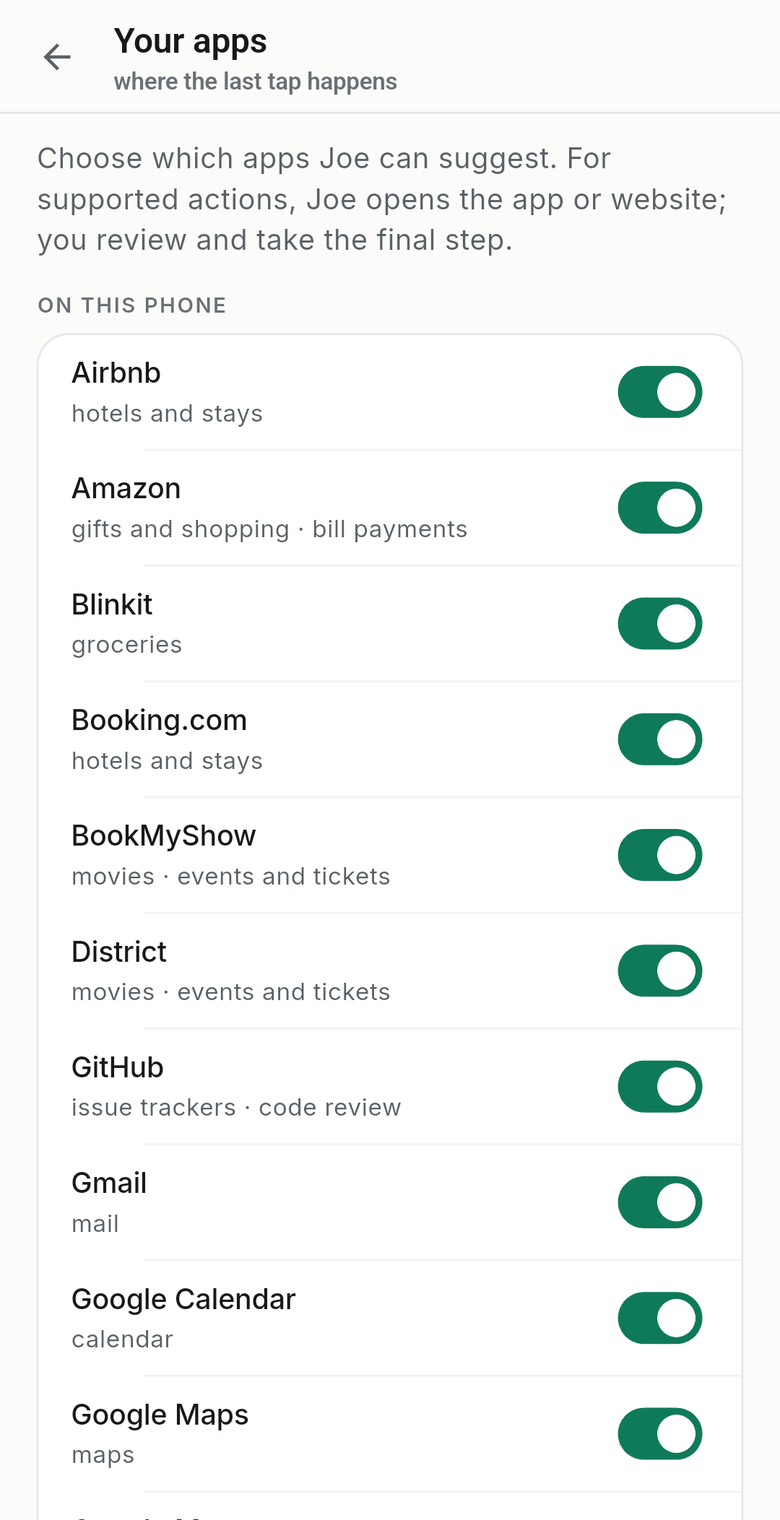
YOUR APPS
Joe prepares. You take the next step.
A birthday gift, a restaurant for Friday, a return flight or a film with friends: Joe helps prepare the request and offers a supported app or website. Where the destination supports it, the search or message travels with you.
The app checks for supported apps on your phone and uses your region and preferences to offer useful choices. Review them in You → Your apps. Availability and the details an app accepts vary by device and destination.
For work, prepare a follow-up or an issue for your team's tracker. For life, keep the plan beside the person and date. You review and confirm in the destination; Joe does not send, book or pay on your behalf.
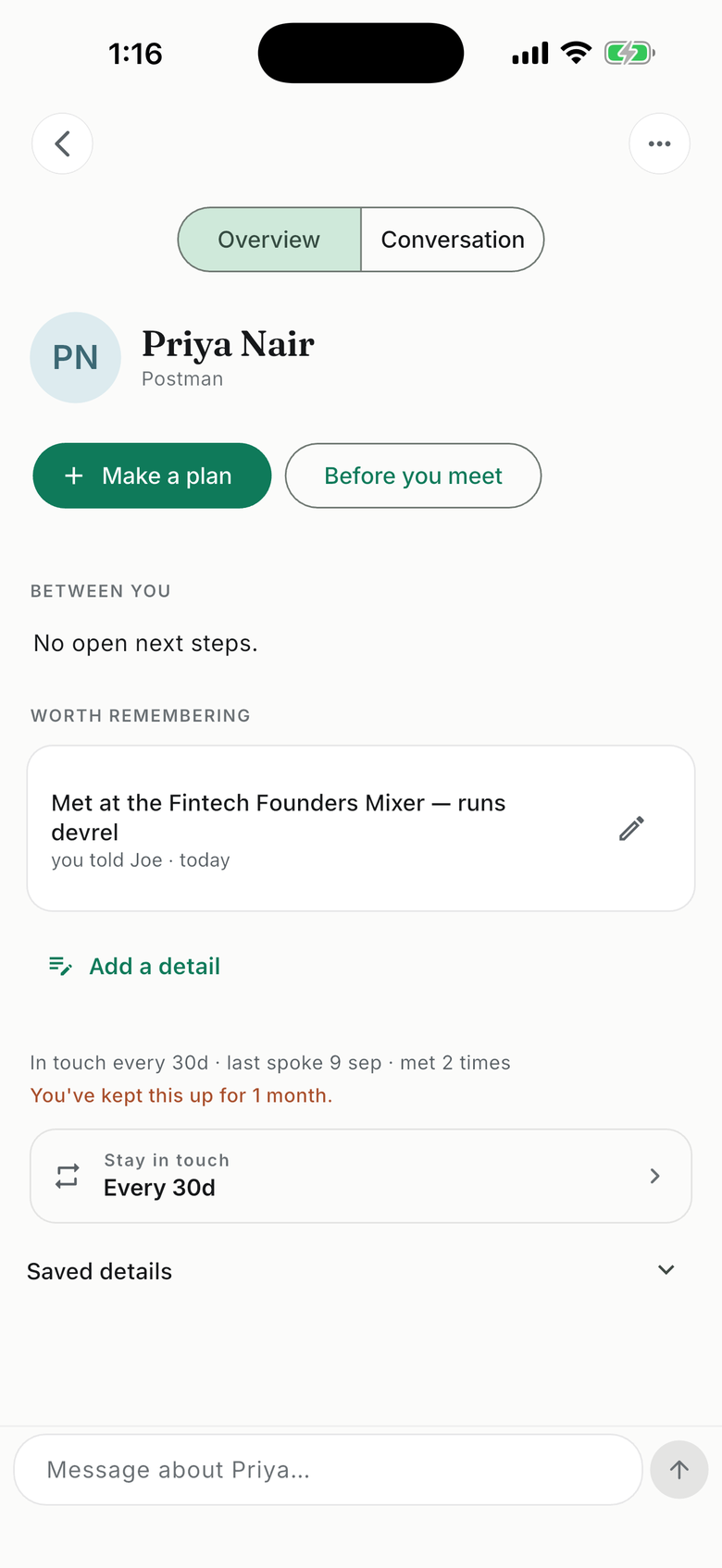
PEOPLE
Bring the small details back.
Where you met. What they enjoy. The birthday you want to remember and the introduction you promised. Keep those details beside your shared commitments so the next conversation starts with context.
Choose which phone contacts to add and which people matter most to you. An optional Google Calendar connection adds scheduled meeting context. Ask Joe to help prepare a conversation or a draft, then make it your own.
Start with one real thing.
“I promised Priya the proposal by Friday.” “Mom loves crime novels.” “My insurance renews next month.” Tell Joe what matters, check what was saved, and let that context help with the next step.
No connections needed to begin. Add contacts, connect a calendar or forward an email when it helps. You choose what to share.
How is this different?
Capture in your own words
Tell Joe once, in your own words, on WhatsApp or in the app. Ask any time: whom did I meet at the mixer, what do I owe this week, is Mom’s birthday sorted.
Joe speaks first
The morning brief, reminders before things are due, prep before a meeting, and a Sunday receipt of what got done. You reply with a tap.
Your apps, your accounts
Joe prepares a draft, search or next step for a supported app or website. Your purchases and messages stay under your control, in the accounts you already use.
A record you can check
Review People and Commitments, with saved details and source references where available. Correct a name or date, change a reminder, or remove something you no longer need.
Trust is the product
You choose what to share and what to act on. Review saved details, manage connections and delete your account from the app.
You choose what Joe sees
Start by telling Joe — where you live and work, your airport, who’s at home. It sits under About you, each item with where it came from, to confirm, correct or forget. Add only the phone contacts you pick, and connect Calendar or forward email only when they would help.
Sources are read-only
Google Calendar is read-only. Forwarding shares the email you send; Joe saves useful details and source references in the app. Forwarding does not grant access to the rest of your mailbox.
Correct or delete anything
Edit a saved detail, disconnect a source, or delete your account, in the app or by email. Joe says what he saved, so you can check it.
No ads. No selling your data.
Joe uses AI services to interpret what you share. Check suggestions before acting, especially names, dates and amounts. Our privacy policy explains processing and analytics.
Questions about Joe
Who is Joe for?
JoeHukum is a personal CRM and executive assistant app by Aryabhatta Labs, for working professionals whose responsibilities cross work and home. Keep people, preferences, important dates, promises and bills together, on WhatsApp or in the app, and let Joe bring each one back when it matters.
How do I get started?
Start on WhatsApp or sign in to the iPhone or Android app. Joe is in a limited beta: have your invite code ready if prompted, or ask an existing user for one. After activation and the AI disclosure, try one real reminder or detail about someone. Link WhatsApp in the app to keep both connected to the same account.
How is Joe different from a general AI chat?
Joe is built around lasting records and follow-through: people, their preferences, shared promises, bills and important dates. You can review those records, get reminders and prepare the next step with their context. Supported apps and websites handle the final action, with you in control.
Do I need to connect my calendar, email or contacts?
No. Start by telling Joe what matters. Calendar can add scheduled meeting context, and you select which phone contacts to upload. For email, forward a bill, statement or message to your Joe address shown in the app, or set up a forwarding filter; Joe saves the useful details with a source reference and never sees the rest of your mailbox. On WhatsApp, send the PDF or a screenshot instead. Our privacy policy explains how forwarded copies are handled.
Can Joe read my other WhatsApp chats?
No. Joe receives the messages and media you send or forward to its own WhatsApp conversation. It does not read your other chats. Link your number to use the same saved context in the app and choose where Joe can reach you.
Which apps does Joe open?
Joe offers supported apps and websites for gifts, food, restaurants, travel, events, bills and work tools. Choices depend on your region, preferences and the apps detected on your phone. A destination may accept a prepared search or message, or open a page where you finish entering the details. Review the list in You → Your apps. WhatsApp-only users get regional links; installing the app adds phone-specific context.
Will Joe send messages, buy gifts or pay bills for me?
Joe helps you prepare, then you review and send, choose, book or pay in the destination app or website. Joe does not ask for those account passwords or payment-card details. Reminders to you use the delivery channels you enable.
What if a detail or date is wrong?
Edit the saved detail or tell Joe what to correct. You can change a task’s date, add a note, mark it done or skip a suggestion. Review the original source when one is available before acting on a bill or deadline.
What does Joe cost?
Joe is free during the trial. Check You → Your plan in the app for your current limits. Connection availability can also vary by account. Any future paid plan will show its price before you choose it.
Start with one thing on your mind.
A person, a promise, a bill, an upcoming date. Tell Joe in your own words.
Limited beta. Have your invite code ready if Joe asks for one. Need a code? Ask someone already using Joe.